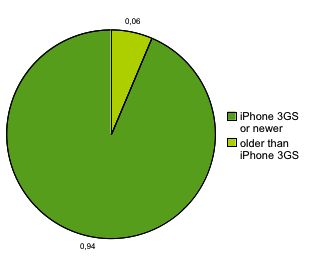
Only 6% users use iPhone 3G and 2-th generation iPod and the major part (3/4) maiden up by iPhone 4/iPhone 4S.
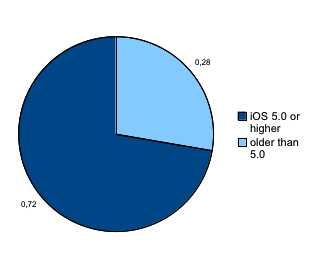
iOS version statistic:
Almost 3/4 of users switched to iOS 5 as well.
So I think that the conclusion is simple: if you are not Facebook or Google and if you have no enough resources to support older iOS version, drop of the support of old devices and iOS version. Do not waste your time and efforts to support iOS older then 4.0 and to optimize your code to run smoothly on device older than iPhone 3GS. Or read this perfect article by Joel about drums and software optimization.
SVGKit works good only with shipped samples and crahes on “real world” SVGs.
CKSVG looks good, but it doesn’t support iOS out from box as soon as it’s designed for Mac, and opens my files with some errors (anyway better than SVGKit)
The main problem is a lack of free time. I had no time to fix compilers’ error, crashes and port code for Mac to iOS. I needed a ready solution and I need it quick.
I was not alone in my research. Another guy had a same problem (and I made the same reserch as me). But I could not use unstable solution in hope that it will work in my case, so I started a little investigation and I found out, that SVG can handle touches and executes javascript. OMG it can be even animated! So I tried to put it into UIWebView and now, at 1:47 am looks like I succeed.
First, SVG can be loaded with a loadHTMLString: method; I had to use this code instead:
NSData * svg = [NSData dataWithContentsOfFile:[[NSBundle mainBundle] pathForResource:@"africa" ofType:@"svg"]];
delegate’s method!
I still had to get rid of nasty black rectangle (link highlighting) when I tapping on map, but anyway, this approach is much better than rasterization my SVG images or dealing with buggy third party code…